
Connecting an enterprise ERP to an artificial intelligence agent used to require verbose XML-RPC connectors, fragile session cookie handling, or positional array serialization that large language models (LLMs) frequently misformatted. With the introduction of the External JSON-2 API in Odoo 19, integration architecture enters a new era: every model and public ORM method is exposed through a stateless HTTP contract built around named JSON parameters.
This guide explains how to connect an AI agent to Odoo via the JSON-2 API, which endpoints are accessible, and what you can safely automate in production.
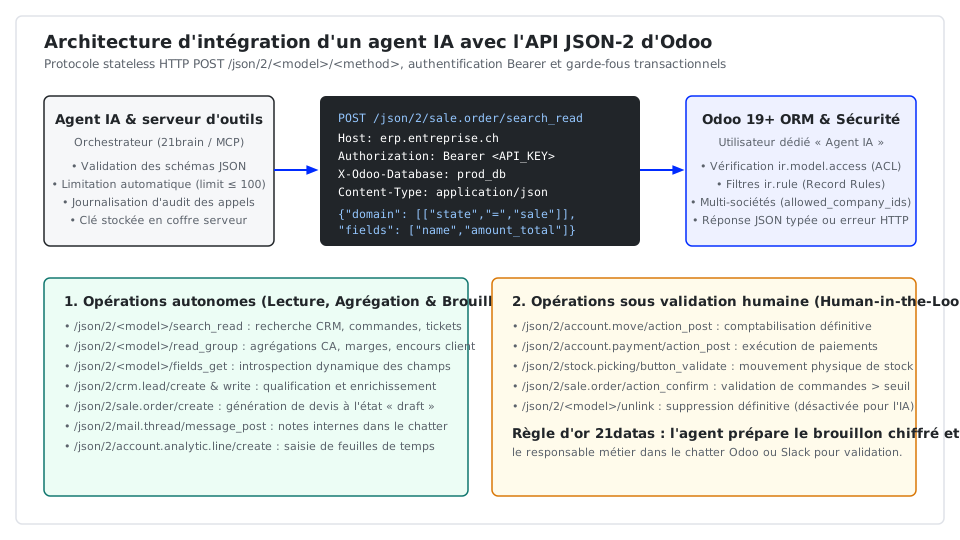
Why Odoo's JSON-2 API is built for AI agent tool calling
Legacy integrations relied on /xmlrpc/2/object (execute_kw) or /jsonrpc. For LLM tool calling, those endpoints had two major drawbacks: deeply nested positional lists ([[['is_company', '=', True]], {'fields': ['name']}]) and non-standard HTTP semantics.
The JSON-2 API solves both challenges through four design choices:
- Clean URL routing per model and method: Every request targets
POST /json/2/<model>/<method>, where<model>is the technical Odoo object (res.partner,sale.order,account.move) and<method>is the ORM or business method (search_read,read_group,create,write). - Stateless Bearer token authentication: A revocable personal API key is passed in the
Authorization: Bearer <API_KEY>header. Nosession_idcookie or CSRF dance is needed. - Named JSON request bodies: Agents pass a flat JSON object (
domain,fields,ids,vals_list,context), matching the exact JSON Schema structure expected by modern LLM function calling. - Self-documented
/docendpoint: Every Odoo instance exposes an interactive API explorer at/doc(available on Odoo Custom plans and On-Premise / Odoo.sh deployments).
Step-by-step connection setup
1. Provision a least-privilege service user in Odoo
Never hand an administrator API key to an AI agent. Create a dedicated technical user (e.g., ai-agent@company.ch), assign only the minimum access groups (CRM read/write, draft sales quotes, analytic read), and generate an API key under Preferences → Account Security → New API Key.
2. Calling /json/2/<model>/<method> from Python
Every request includes Authorization, Content-Type: application/json; charset=utf-8, and X-Odoo-Database:
import os
import requests

ODOO_URL = os.environ["ODOO_BASE_URL"]          # e.g. https://erp.company.ch
ODOO_DB = os.environ["ODOO_DATABASE"]           # e.g. company_prod
ODOO_API_KEY = os.environ["ODOO_AGENT_API_KEY"] # Scoped service user API key

def call_odoo_json2(model: str, method: str, payload: dict) -> dict | list:
    """Execute a stateless call against Odoo's JSON-2 API."""
    url = f"{ODOO_URL}/json/2/{model}/{method}"
    headers = {
        "Authorization": f"Bearer {ODOO_API_KEY}",
        "Content-Type": "application/json; charset=utf-8",
        "X-Odoo-Database": ODOO_DB,
        "User-Agent": "21datas-agent-connector/1.0",
    }
    response = requests.post(url, headers=headers, json=payload, timeout=30)
    response.raise_for_status()
    return response.json()
Accessible ORM and workflow endpoints
The JSON-2 API dynamically exposes public methods permitted by the caller's ACLs (ir.model.access) and Record Rules (ir.rule):
| JSON-2 endpoint | Key JSON body fields | Purpose for an AI agent |
|---|---|---|
POST /json/2/<model>/search_read | domain, fields, limit, offset, order | Filter and fetch records in a single round-trip. |
POST /json/2/<model>/read_group | domain, fields, groupby, lazy | Compute SQL-level sums, averages, and counts without flooding LLM context. |
POST /json/2/<model>/search_count | domain | Count matching records (e.g., overdue invoices). |
POST /json/2/<model>/fields_get | attributes (string, type, relation, selection) | Inspect model schemas and custom x_studio_* fields dynamically. |
POST /json/2/<model>/create | vals_list, context | Create new records (CRM leads, draft quotes, project tasks). |
POST /json/2/<model>/write | ids, vals | Update specific fields on existing record IDs. |
POST /json/2/<model>/message_post | ids, body, message_type, subtype_xmlid | Post internal analysis notes directly into the Odoo chatter. |
POST /json/2/sale.order/action_confirm | ids | Trigger business workflow transitions (confirming a quotation). |
What you can truly automate in production (and essential guardrails)
1. High-ROI autonomous capabilities
- Natural-language analytics with
read_group: Never let an LLM fetch 25,000 invoice lines viasearch_readto sum them in its prompt. By binding a tool to/json/2/account.move/read_group, PostgreSQL computes exact revenue and margin aggregations by month or salesperson and returns a compact summary table. - CRM qualification and draft quotation generation (
crm.lead&sale.order): When an inbound inquiry arrives, the agent checksres.partner, retrieves customer pricing fromproduct.pricelist, updatescrm.lead, and creates a complete draft quotation (state = 'draft') insale.order. - Support triage and chatter summaries (
helpdesk.ticket&project.task): The agent inspects incoming tickets, searches technical documentation, checks SLA status, and posts a drafted solution as an internal note via/json/2/helpdesk.ticket/message_post. - Assisted timesheet logging (
account.analytic.line): Translating Slack updates or calendar events into structured timesheet entries linked to the right project and task.
2. Production guardrails: where human-in-the-loop is mandatory
- Disable
unlinkand autonomous accounting posts: Never grant the agent permission to delete records (unlink) or callaction_postonaccount.move(invoices/journal entries) oraccount.paymentwithout human approval. Have the agent prepare the draft record and notify the accountant in the chatter. - Wrap JSON-2 behind typed MCP tools: Expose narrow, schema-validated functions (
search_customer_invoices,create_draft_quotation) that enforcelimit <= 100rather than raw unconstrained ORM access. - Enforce idempotency: Check external references before calling
createso network retries never duplicate partners or orders.
Want to connect your Odoo ERP to governed AI agents or deploy 21brain across your ERP and data engineering stack? Book a meeting or contact our team.
in Data